A search bar may seem like a small part of a website or digital platform. But as soon as you offer hundreds of products, articles, documents or services, good search functionality becomes essential.
Traditional search functions often depend heavily on the words someone types. Is a search term not literally in a product name, document or text? Then the user sometimes gets poor results or nothing at all. AI enables a different form of searching.
With semantic search, vector search and natural language processing, a search engine can better understand what someone means, instead of only looking at the exact words used.
From keywords to search intent
Suppose someone searches a web shop for:
“A light laptop that I can work on for a whole flight.”
A traditional search engine mainly looks for pages containing words such as light, laptop and flight . A semantic search engine tries to recognize the meaning behind that question. The user is probably looking for a laptop that:
- weighs relatively little;
- has a long battery life;
- is suitable for working on the go;
- is easy to take along.
Those properties don't have to appear literally in the same wording on a product page. That is the main difference between traditional keyword search and semantic search: the search engine doesn't only look at individual words, but also tries to take meaning and context into account.
What is semantic search?
Semantic search is a form of searching in which software tries to determine the meaning behind a search query. Techniques such as natural language processing, machine learning and vector search can be used for this.
In vector search, texts, products or other data are translated into numerical representations: embeddings. Content with a similar meaning gets a similar position in a so-called vector space. As a result, the system can find content that semantically matches a search query, even if exactly the same words are not used.
The Elastic documentation on semantic search explains, for example, how a query such as “vacation rules” can still find a document about “annual leave policy”. The words used differ, but the meaning is close.
In the same way, a system can try to understand that:
- “shoes for a wedding” concerns a certain type of occasion and look;
- “affordable family car” contains properties such as price, space and usage situation;
- “how do I change my billing address?” probably belongs to documentation about account or billing settings.
For the user it mainly feels as if the search function has become smarter.
AI search is more than just semantic search
AI search is sometimes presented as a single technology, but in practice different techniques can work together. A modern search solution can, for example, use:
- keyword search for exact words, names and product codes;
- semantic search for meaning and context;
- vector search to find similarities in content;
- filters and business rules to narrow down results;
- personalization based on relevant and permitted user signals;
- reranking to reorder found results by relevance;
- generative AI to formulate an answer based on found information.
The combination in particular can be powerful. A product code, article number or person's name, for example, you want to be able to find exactly. But for a question such as “which jacket is suitable for a rainy city trip in October?”, understanding context is much more important.
That is why people increasingly talk about hybrid search: a combination of traditional search methods and semantic techniques. Keyword search is strong at exact matches, while semantic search is mainly valuable when users don't know exactly which words are used in the source data.
What are the benefits of a smart search function?
1. More relevant search results
The most obvious benefit is that visitors can find what they are looking for faster. They don't need to know exactly which words your organization uses.
A customer can, for example, search for “sofa for small living room”, while products are described internally as “compact 2-seater sofa”. A good semantic search function can recognize the relationship in meaning between those descriptions.
That doesn't mean every semantic result is automatically relevant. The quality depends, among other things, on the model used, the product data, configured filters, search rules and the way results are ranked.
2. Fewer searches without results
A frustrating moment in every search experience is:
0 results found.
That often happens because a user uses a different word, synonym or phrasing than what is in the database. Semantic search can recognize alternatives in meaning and thereby reduce the number of searches without a usable result.
It remains important to analyze search behavior. Searches without results can also point to missing products, incomplete content or information that visitors do need but that isn't available yet.
3. Searching in natural language
Users are increasingly getting used to asking complete questions to search engines, chatbots and other AI systems. They bring that expectation to websites and digital products.
Instead of:
“return conditions”
someone can search for:
“Can I send a product back if I've already opened the packaging?”
An AI-driven search function can interpret such longer questions and surface relevant information. The visitor therefore has to think less about the exact search term or the way the website is organized.
4. Faster searching in large amounts of information
AI search isn't only interesting for web shops. It can be particularly valuable for organizations with large amounts of content or documents.
Think of:
- knowledge bases;
- help centers;
- universities and education platforms;
- government websites;
- job boards;
- product catalogs;
- internal company platforms;
- technical documentation.
A user then doesn't always have to click through dozens of categories, documents and filters to reach the right information. Filters and navigation do remain valuable, for example when visitors want to narrow results by price, date, location, availability or document type. The search function is thereby an important part of good UX design: the less effort someone has to make to find the right information, the better the digital experience.
From search result to direct answer
A next step is that searching increasingly resembles a conversation. Instead of only showing a list of search results, a system can retrieve relevant information and then formulate an answer.
For example:
User: “Which arrangement applies to employees who work abroad for more than six months?”
The search technology finds relevant policy documents and an AI model composes an answer based on them. The user can then ask a follow-up question:
User: “And does that also apply to freelancers?”
A commonly used technique for this is Retrieval-Augmented Generation, usually abbreviated to RAG. According to Google Cloud's explanation of RAG this approach combines a language model with external information sources. The system first looks up relevant information and then uses it as context for the answer.
The search function thereby becomes less and less a separate search bar and more and more an interface with which users can communicate with information.
An AI answer must remain verifiable
A direct answer is user-friendly, but also brings a new risk. A generative AI model can misinterpret information, miss important nuances or formulate an answer that sounds convincing but isn't entirely correct.
A good AI search function should therefore not only show an answer. Depending on the application, you also want to:
- make the sources used visible;
- offer links to the original documents;
- indicate when insufficient information was found;
- prevent outdated sources from being used;
- respect access rights on confidential documents;
- have critical answers checked by an employee.
The Generative AI Profile of the American NIST from 2024 emphasizes, among other things, the importance of provenance, traceability and control for AI-generated information.
For subjects such as healthcare, legal information, finance, safety or internal company rules, verifiability is not an extra feature, but an important part of the design.
How is AI search used in practice?
Large digital platforms have been investing in machine learning and AI for some time to improve search results, ranking and personalization.
Airbnb, for example, published research in 2024 on a platform with which the company tries to better understand user intent. Deep learning techniques and data about user behavior are used to provide various parts of the platform with more relevant signals. The research can be found via Airbnb's research publications.
Zalando also uses machine learning and large language models within its search environment. In a research publication from 2024 Zalando describes how multimodal language models can be deployed to assess the semantic relevance of product results at scale. The method was tested on 20,000 examples and is intended to evaluate search quality more efficiently.
AI search is by now no longer only within reach of companies of that size. Technology platforms such as Elasticsearch and Algolia offer functionality for semantic search, vector search and hybrid search solutions.
That makes the technology more accessible, but enabling a standard feature is no guarantee of a good search experience. The solution must be set up around the organization's content, users, business rules and technical environment.
A smart search function starts with good data
AI doesn't automatically solve every search problem. The quality of the search experience remains dependent on the information available.
If product data is incomplete, documents are outdated, metadata is missing or different systems contradict each other, even a smart search engine can struggle to give the right result. AI cannot reliably repair missing source information.
That is why a good AI search project often starts with questions such as:
- Which information do users want to find?
- Which searches currently produce poor results?
- Which data and metadata are available?
- How current and complete is that information?
- Which systems contain the source information?
- Which results must always be found exactly?
- When is semantic search more useful?
- Which filters and business rules must be applied?
- Who may see which information?
- May the AI system formulate answers itself or should it only show sources?
The technology comes after that.
How do you measure whether AI search really works better?
A smart search function shouldn't just sound impressive, but demonstrably deliver better results. It is therefore wise to define beforehand how success is measured.
Possible measurement points are:
- the percentage of searches without results;
- the position at which the right result appears;
- the percentage of users who click a search result;
- the number of searches needed to find information;
- conversion after using the search function;
- user feedback on generated answers;
- the correctness and traceability of AI answers;
- the speed and cost per search.
Don't test only with simple example questions. Also use real searches, typos, synonyms, product codes, long questions and situations in which the system should not give an answer.
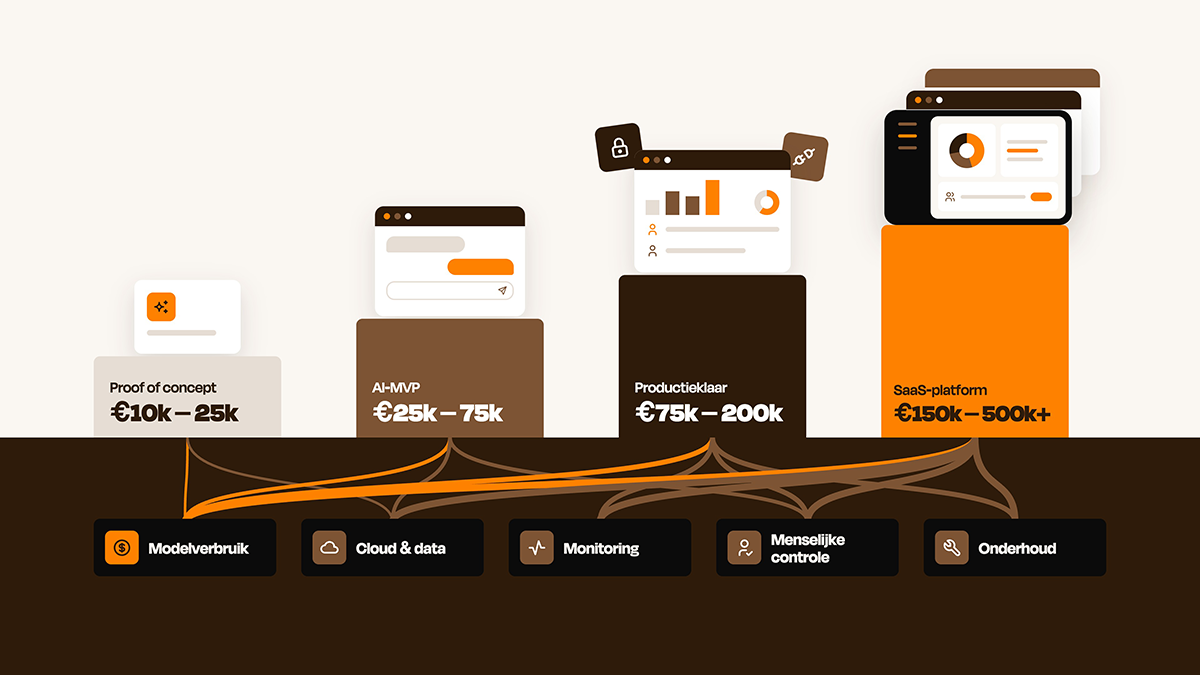
In a custom solution, besides the quality of search results, development, model usage, infrastructure and management also play a role. In our article about the cost of an AI application you can read which factors determine the investment and recurring costs.
When is AI search interesting for your website?
Not every website needs an AI search engine. Do you have twenty pages and clear navigation? Then a complex search solution probably adds little.
AI search becomes especially interesting when users struggle to find the right result within large amounts of information. For example when you:
- offer thousands of products;
- have many articles or documents;
- want to search multiple data sources;
- encounter many different words for the same topics;
- have visitors asking complicated questions;
- need to support multiple languages;
- see in search data that many searches don't produce a good result.
Whether such a search function is relevant is thus strongly related to the type of website or digital platform you have and what users need to be able to do there.
The search function can then change from a practical aid into an important part of the user experience.
From search bar to intelligent interface
The biggest change ultimately isn't that AI delivers a better search bar. It changes the way people use digital systems.
Users need to understand less and less how a website, knowledge base or platform is organized. They can describe what they need and then expect relevant results or a usable answer.
That places different demands on the setup of websites and underlying systems. The challenge therefore doesn't lie only in adding AI. Content, product data, search technology, authorizations, systems and user experience must fit together well.
A smart search function doesn't start with the technology, but with understanding what someone is trying to find.
At Ninjible we therefore look at the complete digital environment: from user experience and information structure to data, APIs, AI and the systems behind a website or platform. That way search becomes not only smarter, but above all more useful for the people who use it.